Mock-ups are used by designers mainly to acquire feedback from users about designs and design ideas early in the design process. Mock-ups are 'very early prototypes' made of cardboard or otherwise low-fidelity materials. The user, aided by the designer, may test the mock-up (imagining that it works) and thus provide valuable feedback about functionality/usability/understanding of the basic design idea/etc.
The advantages of mock-ups (and prototypes) are numerous. For example:
- Mock-ups incite criticism from users because they are low-cost (can be made of cardboard) and low-fidelity. If a user is presented with an early version of a system that has required substantial work, he/she is likely to be more reluctant (as well as able) to critise it.
- When using mock-ups of cardboard or similar materials, the user and designer can collectively change the design using familiar tools such as pens, scissors etc. As such, mock-ups are a discussion medium and a discussion facilitator between designer and user.
- Not only can the mock-up function as a discussion medium between designer and user but also between the members of the design team. Thus, mock-ups may help facilitate work across disciplinary borders, bringing together a disparate team.
- Mock-ups make it possible to do usability testing early in the development process.
- Mock-ups incite and legalise experimentation as they are inexpensive to alter.
- Mockups focus on content and functionality and turn attention away from details of graphic design.
Mock-ups address the idea captured in a popular engineering one-liner:
You can fix it now on the drafting board with an eraser or you can fix it later on the construction site with a sledge hammer.
12.0.1 Examples of mockups
Figure 1 shows a mock-up of a calendar application for school kids made of cardboard and plastic. The mock-up was used to test early design ideas with school children and thus obtain early feedback in the development process. Alternative spellings: Mockup/mockups.
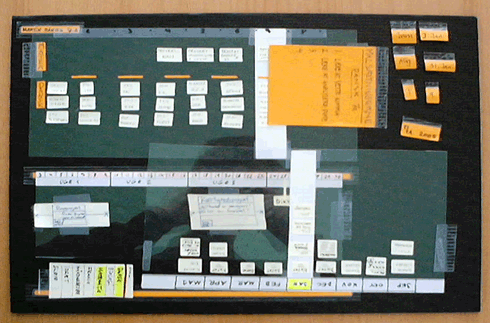
Figure 1: Cardboard Mockup of a calendar application for school kids
After a couple of tests with the mock-up, it was made into a prototype programmed in Macromedia Flash (figure 2). The prototype was more 'polished' and allowed for more interactivity. Using prototype, various scenarios of use (use cases) were tested with the users, after which the Flash prototype was built into a real application (programmed in Java).
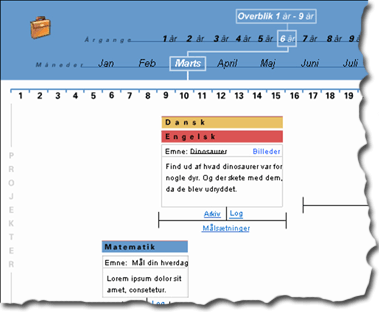
Figure 2: The same calendar application,
this time as a prototype made in Macromedia Flash.
Most projects may benefit from using mock-ups early in the design process. Figure 3 shows a mock-up of a webpage being tested by a user.
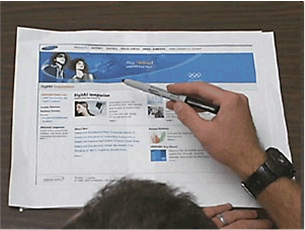
Figure 3: A mock-up of a website
(source and copyright of picture is unknown)
Please note: The terms "mock-ups", "low-fidelity prototypes", or "paper prototypes" are usually used as synonyms.